หน้าเว็บ

Showing posts with label application. Show all posts

09 June 2011

Car Maintenance Reminder Pro


Keep That Car Running - Keep Track of Fuel Costs - Maintenance Maven - Never Forget a Car Inspection - Go With The Pro

Keep That Car Running
Car Maintenance Reminder Pro helps you to track the service records of your cars, including oil change, tire rotation, change of engine or cabin air filter, and annual state inspection. Using this app's intuitive system of statistics and reminders, you can significantly improve the reliability and performance of your car.

Keep Track of Fuel Costs
Now more than ever, it's important to know how much you're spending on gasoline. With its fuel logging function, Car Maintenance Pro generates useful statistics about MPG, gas price, driving distance per day, volume per fill up, and cost per day. It also provides ten graphical charts (Android OS 2.0.1 and up) for detailed and clear reports of your car's mileage, fuel economy, and costs.

Maintenance Maven
For the maintenance reminder function, Car Maintenance Reminder Pro provides comprehensive logging and reminders for almost all regular car services based on both mileage and dates, such as oil change, tire rotation, wheel alignment, air filter change, coolant flush, transmission fluid change, brake pad change, timing belt replacement, annual inspection, and spark plug
Never Forget a Car Inspection
Create your own customized service reminders and write notes about your cars, such as part number, state registration, appointment time, and your mechanic's phone number. With just a glance at your phone, you have all your car's service records at hand. Notifications on your Android device's status bar automatically show up to remind you when a service is due within a week or 200 miles. You'll never miss another needed maintenance.

Go With The Pro
Exclusive features for the Pro version include the ability to add an unlimited number of cars, the option to restore data from the SD card, and no advertisements and no internet connection required. If you're serious about keeping your car in good mechanical condition, and you'd just as soon avoid getting tickets for expired inspections, you'll want Car Maintenance Pro on your smartphone.


Features

  • Convenient options to customize the display and reminders
  • Graphical and quantitative representation of maintenance schedule;
  • Easy update of the date and mileage;
  • Reminder at the status bar when a due date is within 7 days, or mileage left is less than 200 miles/km
  • Handy vehicle identification by logo of the make, with more than 50 makes supported

08 June 2011

Cardio Trainer Pro


The BEST Android application I've run across. And speaking of running, Cardio Trainer has features for running, biking, treadmill, jogging,walking, the whole nine yards when it comes to exercise. It can log the calories you eat and track you weight, it has GPS for recording you workout methods. You can even race yourself to see if you can beat your workout time. Lastly, it can synchronize your data to Noon and Google Health, which is a pretty good add on to this laundry list of features. If you want a great workout app, this is it. If you're looking for an app that shows off the developing prowess of Android, you've found it.


WorkSmart Labs' CardioTrainer Pro, which builds upon the features included in the popular CardioTrainer app, turns your Android phone into a detailed and customizable personal fitness tracking device. Keep an eye on your workouts, track your progress en route, and share your results with like-minded exercise aficionados. By recording and tracking all your workout details, CardioTrainer Pro is a handy and popular tool to keep track of each of your workouts.

Pro Features
CardioTrainer Pro's additional features help you stay active and make fitness and exercise more fun and thus more productive.
  • Adds six levels of interval training
  • Includes 20 levels of difficulty
  • Provides audio and video feedback during workouts
  • Free upgrades for life

Gaia GPS Topos and Tracking


Outside the track, road and back, or turn abroad? Gaia uses GPS to navigate anywhere you are not connected.

Love to hit the trails? Enjoy discovering seemingly untouched hideaways? Gaia GPS is an awesome app companion when you want to take the road less traveled. Hiking, biking, trailblazing, or just getting lost in the urban jungle are all supported by Gaia GPS: a full-featured outdoor GPS app.


Before you go off-roading, search for and download a detailed map of that area. Choose as large of an area as you like, and pick from different map sources. A road map is perfect for urban adventures and Cloudmade Topo has several pretty awesome options for topographical maps. A combination of both will have you covered on long road trips. Use Gaia GPS to navigate anywhere you aren't connected!


Gaia allows you to:
• Download maps for when you do not have an internet connection.
• View maps and topographic maps. Mytopia use maps in USA / Canada, and CloudMade Topo maps and maps of the world.
• Record label tracks and waypoints.
* Use the compass to navigate.
* Get the distance / bearing / ETA guidance.
* Choose from UTM / MGRS / DMS / DDM or decimal coordinates.
* Exhibitors metric or imperial.


FolderOrganizer


This app makes Android what it should be! I hate clutter and now I can give each app, bookmark, widget etc. it's own custom icon as well as organize into folders & the folders each look different. No more generic looking folders!

It takes 8-10 uses to understand the logic and then you can do anything you can imagine. It comes w/ a lot of icons, but if you use Google images you can download logos, tags or any sort of image appropriate for the folder, bookmark etc that you create.

Want more control over the file structure of your smartphone, or would you love to be able to organize your apps, bookmarks, contacts and shortcuts the way you want?
Group items according to labels and create fully customizable folders and widgets with FolderOrganizer. You can organize apps, bookmarks, contacts and shortcuts, change folder icons, sort folder items any way you like, and make app shortcuts with custom icons and names.

FolderOrganizer Features
With hierarchical labels, easily categorize all items. You can create and edit folders, manually sort items in a label, create scrollable widgets with five items in a row, change label icons, and rename apps and change app icons.
Make sense of all the stuff on your smartphone. Get FolderOrganizer.

iSyncr for PC


Many converts from the iPhone look for solutions to keep their iTunes library in sync with their phones without a great effort. third-party applications that provide this functionality is not new, but often require you to use a new application for media management as DoubleSync. You will be pleased to know that you do not have to ditch iTunes in order to enjoy powerful media management, though, thanks to iSyncr.


From here, you are presented with an interface that will allow you to select the tracks you want to synchronize. Going deeper, you may only have to synchronize the selected items in iTunes, select the name of the music folder will be sycned, and you can have is to delete all files on the phone that are not on the lists you choose to synchronize. Once you get everything the way you want, just press the sync button and you're done. It takes a while 'on first sync if you have a ton of content, but this is true for any synchronization solution.

Features

  • Sync your iTunes library with your Android device
  • Choose which playlists you want to sync
  • Keep smart playlists current with play counts and ratings from your phone
  • Sync Amazon songs purchased on your phone back to your iTunes library
  • Get set up quickly with the in-depth tutorial

05 June 2011

ezPDF Reader


Get convenient, hassle-free PDFs directly to your Android device with ezPDF Reader. A must-have mobile PDF viewer, ezPDF Reader is designed specifically for PDF documents. Clearly presented without the fluff, documents appear as they would on your PC, but customized to fit your mobile device's screen. Fully featured and one of the best-rated PDF viewers out there, ezPDF Reader is updated regularly in order to add new features or to improve upon existing ones.

ezPDF Reader is an vast improvement over Aldiko for reading PDFs in several of ways:

1) Much more stable on the Xoom
2) Better use of the extra screen real-estate on a Xoom (such as a windowed view of the table of contents rather than a full screen version--less disorienting)
3) "Fitting to Text Column" (aka fit width) feature: awesome feature for making the most of the Xoom's 16:10 screen ratio. Aldiko may have a similar feature, but I never used it if it did.

Other additional non-Xoom-specific improvements/features are:
1) Text-To-Speech
2) Smoother pinch to zoom (Aldiko lags when zooming)
3) Thumbnail support (both apps support table of contents)
4) Quicker access to table of contents (very nice for reference material)
5) Annotation and freehand draw support

Aldiko does have features that beats out ezPDF or that ezPDF just doesn't do such as:
1) ePub format support
2) A fully-integrated ebook store
3) Shelf library view support (both apps support a list view)
4) Better/more-intuitive cataloging feature (ezPDF uses a less intuitive folder technique)

To summarize, ezPDF provides for a better pdf reading experience while Aldiko is stronger at library management and provides a more complete ebook solution. For those that need Aldiko's non-pdf features, I'd recommend complementing Aldiko with ezPDF if you read a lot of pdfs, especially on the Xoom.

mSecure Password Manager


mSecure store important and sensitive information secure.
mSecure is super safe, simple, and provide secure access to data across multiple platforms.

Super Security: mSecure recognized by industry data encryption, secure storage of confidential and valuable information, such as the network name and password, credit card numbers, frequent flyer programs and the social security number so that the guards Safety information should be lost or Pirates.

Easier Security: mSecure write robot is essentially a robot from a robotic quality products and the appearance of features such as collapsible section header, research, and 17 predefined templates, such as network access, credit cards, e-mail account , which allows you to quickly start using mSecure.

Security is everywhere: mSecure robot is also fully compatible with the company mSecure popular Macintosh and Windows desktop product data synchronization between your desktop and the phone.


Features

  • Protect your information with 256bit Blowfish encryption
  • Generate passwords and get hints for forgotten passwords
  • Customize your own information types with unlimited fields and unique icons
  • Search for a particular record
  • Keep your data safe with Self-destruct mode to delete information after a number of failed attempts

04 June 2011

TaskKiller Pro


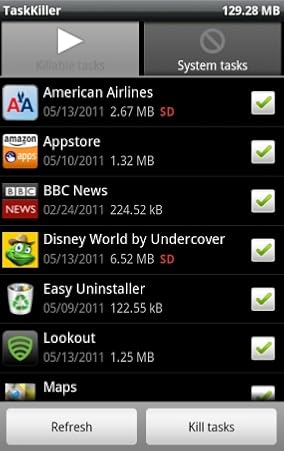
TaskKiller Pro helps increase your Android device's battery life, speed up performance, and manage all your applications. It kills tasks when the screen turns off, sets up blacklists, does batch uninstalls, moves apps to the SD card, and tracks memory usage.

Features

  • Save battery life by killing unneeded tasks
  • Speed up your phone performance
  • Do batch uninstalls
  • Move apps to the SD card
  • Set up blacklists for apps that shouldn't be killed


Avoid Battery Drain
Android phones keep unused running programs in memory. Using multiple applications in a session can cause the device's RAM to be overloaded, which in turn drains the battery and slows down the device's performance. TaskKiller Pro ends unused tasks kept in memory, thus speeding up your device and extending its battery life.
Set up TaskKiller Pro to end unused tasks when the phone screen turns off by using the Kill on Pause functionality. You can also setup TaskKiller Pro to end unused tasks at a given rate by using the Auto Kill functionality. The Auto Kill functionality can be active only when the phone is asleep or when the phone screen is on. The combination of the Auto Kill and Kill on Pause functions is very effective in conserving battery life.

Keep Important Apps Running
Blacklists allows a detailed configuration of the tasks managed by TaskKiller. The System blacklist includes every application that TaskKiller will never end, such as the default applications that were preinstalled on your device. The Auto Kill blacklist includes the applications that shouldn't be killed under any circumstances. The Kill on Pause blacklist includes the applications that shouldn't be killed when the phone screen is turned off, such as MP3 players and GPS trackers.
Streamlined App Management
The uninstaller tool is designed to help you uninstall one or more applications from the phone. It displays the list of installed applications with the location (SD or not), size, and setup date. Select the applications you want to remove and click on the Remove button for a rapid uninstall.
The Move 2 SD tool is designed to help you change the setup location of the phone applications. The tool is only available for Android 2.2 and above. Select applications that can be moved to SD and click on the Move 2 SD button to move selected applications to the SD card. You can also move applications from the SD card to the phone's internal memory. A notification will help you to know when an installed application can be moved to the SD card.

02 June 2011

Fancy Widget Pro

Pulls weather from accuweather or google, has very similar customizing options to fancy widget as well as the weather animations look almost exactly the same. Beautiful widgets has 11 widgets now, including: battery, home weather, smaller home weather, 4 different sizes of their "super clock", 2 different sizes of "today", 2 different sizes of weather, and 12 toggle widgets(brightness, wifi, bluetooth, etc). BW has a market of their own as well, to download and apply skins to the clock, superclock, weather, battery, and toggle widgets. They also have a live wallpaper which is pretty cool. It's more of a novelty, as I don't like running heavy live wallpapers all the time. But the wallpaper changes as the weather changes. If it's stormy, so is it on your phone etc. 
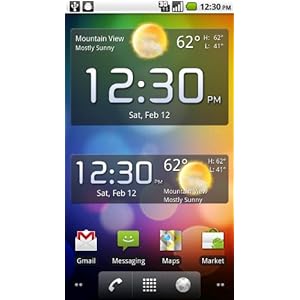
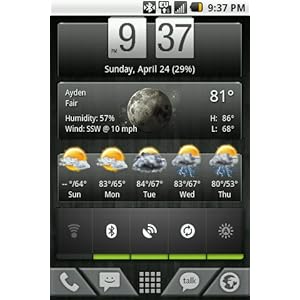
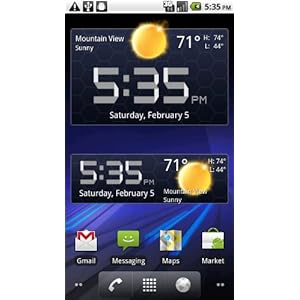
Fancy Widget Pro is an aptly named application; this feature-packed widget is a clock and weather app with a comprehensive range of customization options. This upgraded widget has even more features than Fancy Widget.


Widget Weather
Fancy Widget Pro always keeps you on top of the latest weather. This widget shows current weather conditions and 3-day weather forecasts based on your choice of Google Weather or Weather Bug. This widget features Celsius and Fahrenheit support, geo-location for weather, fancy weather animations, and severe weather alerts with customizable notifications. You can configure the refresh interval as well.

Your Widget, Your Way
The Pro version has an extra flip clock widget style with skin support. Set up both clock-only and weather-only widgets. View automatic sunrise/sunset time calculations. Fancy Widget Pro also monitors your Android device's battery level monitor, so you can keep close tabs on that dwindling power supply.


SoundHound Infinity


Sure, we're talking about an 'interesting application similar to the better known Shazam. It's called SoundHound and perhaps only flaw, is not entirely free, like his predecessor, but its features do not stop at just recognition of music, so let 's see more details in what has developed this application from' homonymous company .


We leave from their duties views of Shazam, and the possibility of recognizing an audio track played from an external source, which can be heard a song that particularly struck by car or the soundtrack of a TV spot or movie that absolutely want to know the author and title. Well, SoundHound allows us to view this information directly on our Nexus or Android phone.


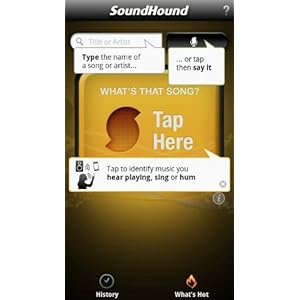
SoundHound Infinity is instant music search and discovery, with the world's fastest music recognition. It is the ultimate music app, ad-free with unlimited usage and premium features.
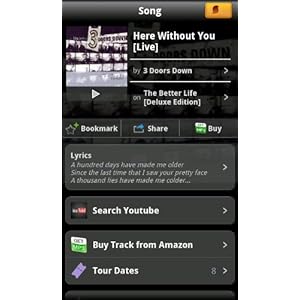
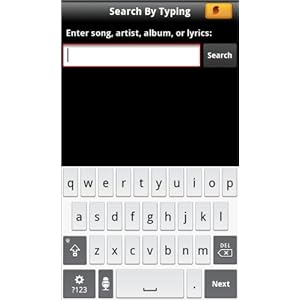
Say it, tag it, sing it, hum it, or type it -- SoundHound Infinity offers every gateway of music search. Boasting the world's fastest music recognition, the world's only sing and hum recognition, and voice-directed search, it lets users find and explore music faster than ever before with rich content including cover art, videos, lyrics, song previews, recommendations, tour dates, and more, all with one tap access.

SoundHound Infinity's Android home screen widget, included only in the paid version, allows you to put the SoundHound widget on your homescreen, giving you immediate, one-tap launching of the music recognition feature. A heavily requested feature by Android device users, the SoundHound widget is the fastest way to ID a song. Even if the song is about to end, you may still capture it!

Key Features
  • Blazing fast music recognition: name tunes playing from a speaker in as little as 4 seconds
  • The world's only viable singing and humming recognition
  • Voice recognition music search: just speak a title or band name to check it out
  • Lookup song lyrics
  • Song previews allow you to listen and sample tops hits and new discoveries
  • Buy link for instant music downloads, including Amazon MP3
  • Song mapping allows you to see where you discovered your songs on a map, and can be viewed later in your History
  • Social sharing: it's fast and easy to share your song IDs via Facebook, Twitter, SMS, and e-mail
  • Optimized for both phones and tablets, including Motorola Xoom and Samsung Galaxy Tab

PicSay Pro


Pic Say Pro is a useful program for those who use, for business or fun, image editing programs. Pic Say Pro can improve the quality of our photos, just as if we had a sort of Photoshop to mobile phones.

Among the key features of this program, we can see the possibility to change the color of the images, for example, through color correction. If we want to totally change the image, then we can choose the distortions or to apply a special effect to our photos. But the features do not end there, in fact Pic Say Pro is really a graphics program to Android very comprehensive, functional and easy to use, thanks to a very intuitive interface.

We can also decide to apply the additions to our photos, such as a ball of comic books and write inside the text. Pic Say Pro allows us to have in my hands a very powerful photo editing tool, whose only limit is our imagination.

Features

  • Make color pop out of black and white pictures
  • Make fun of your friends by decorating their pictures with hair, glasses, beards, and other stickers
  • Give your photos an authentic look with effects like Lomo, Cross Process, Vignette, and more
  • Cut out any part of one picture and place it on another. Mix heads, ears, hats, or any other object or body part.
  • Get artistic with Paint, Pencil Sketch, and Neon effects
Comprehensive Features
  • Employ special effects: Adjustments, Distort, Color Adjustment, Artistic, Photo Effects, Filter and Frame
  • Add to favorites and export photos to Flickr, Picasa, Facebook, SMS, E-mail, and more
  • Keep track of a photo's history
  • Add cool stickers: funny, seasonal, symbols, nature, emoticons, accessories
  • Import pictures at three different resolutions
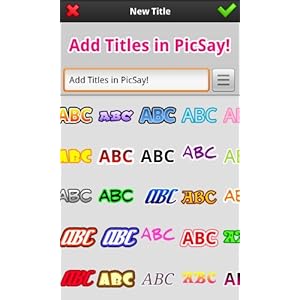
  • Insert a wide range of title fonts with customized color adjustment


Out Of Milk (Limited Edition)


Shopping List, Pantry List & To-Do List in a intuitive and easy-to-use app

* Multiple Shopping & To-Do Lists
* Scan or manually enter items in your Shopping Lists
* Plan grocery list
* Shopping List History remembers items
* Pantry Lists let you inventory anything so you always know what's in your pantry
* Share lists
* Move or copy items between Shopping List and Pantry Lists
* Displays grand total and running total on your Shopping List
* View price history while editing a Shopping List item

Managing Lists Made Easy
Out of Milk (Limited Edition) is the ultimate list application for your Android phone. Keep this app with you at all times so you'll never forget your grocery list in the car. You can even keep track of what's in your pantry and create your custom to-do list for the day. Whether you're looking to go grocery shopping or you just need to keep an eye on your daily goals, this app has you covered.

Limited Edition Advantages
• Get this limited edition for a one time price of $4.99 (no subscription fee)
• Add additional users for a small monthly fee
• Place the widget on your home screen
• Backup your data with ease
• Manage your coupons while you make your lists
• Register for an account to unlock additional features.
• Synchronize your lists online and share them in real-time with others
• Sign in to your account and manage your lists online at OutofMilkApp.com


29 May 2011

I Just Forgot


Funny, likeable Little Critter is at it again! He struggles to remember what he is supposed to do each day. On rainy days he remembers his raincoat but forgets his boots. On school days he gets to school on time but forgets his lunchbox. At home he takes a bath but forgets to use soap. Poor Little Critter! He tries hard but hasn't quite mastered the art of how to get through the day. Every young child will understand Little Critter's confusion and laugh with him from start to finish!
Mercer Mayer's delightful story is a pleasure to read, for kids and grownups alike. And this deluxe, interactive omBook from Oceanhouse Media can help build your child's reading skills in exciting new ways.
  • Choose from 3 ways to read this story: Read to Me, Read it Myself, or Auto Play
  • Listen to professional narration and fun music and sound effects
  • View Mercer Mayer's delightful art on pages that pan and zoom
  • Read or follow along as the words are highlighted; touch words to hear them again
  • Touch any image on the screen and its word will pop up
Listen, Read, Laugh, and Learn
Choose one of three ways to enjoy the story: Read to Me, Read it Myself, or Auto Play. The Read to Me option allows your child to listen to the narrated story, highlighting the words as they are read. The Read it Myself option allows your child to read each page in the traditional form and turn each page with a swipe. Auto Play will play the story like a movie, automatically reading and turning the pages; this is the best option for very young children.
From page to page, your child can touch anywhere on the screen and learn a new word. Individual words are highlighted as the story is read, making it simple for children to follow along and recognize words. Touch the words or long-press any paragraph to have them repeated. To enhance learning by picture and word association, your child can touch any image on the screen and the word will pop up, identifying the object in bright, bold letters

28 May 2011

SketchBook Mobile

Autodesk SketchBook Mobile and professional paint and drawing application designed for Android. SketchBook Mobile offers a complete set of drawing tools and provides them to you through an intuitive user interface.

Use it to capture your ideas in a digital format like sketches on a sheet or step by step to produce your own creations.
SketchBook Mobile offers sophisticated brushes and pencils fluid.
  • Easy to use drawing application
  • Includes a full set of sketching tools
  • Allows importing photos
  • Provides up to six layers
  • Exports images in several formats

Budding artists, casual doodlers, and seasoned sketchers alike will enjoy SketchBook Mobile for their Android device. SketchBook Mobile, from the makers of the popular SketchBook desktop software, provides a full-featured drawing application and image studio that lets you follow your artistic bliss wherever you go with your phone or tablet.

27 May 2011

Quickoffice Pro


Here comes one of the programs probably the most anticipated of the holders of Tablet Android (a few at the moment). We are talking about Quickoffice Pro HD, a suite of products dedicated to those who use their tablet for work and to manage their documents.

Quickoffice Pro HD lets you open / edit Word documents, Excel, PowerPoint and view PDF files without problems by exploiting fully the potential of the system Android 3.0. It is also compatible with the most important cloud data systems such as Google Docs, Dropbox, MobileMe, SugarSync, Box.net, and others.


Key Features


  • Take your work with you with this mobile Microsoft Office application
  • Create, view, and edit Word, Excel, and PowerPoint files on the go
  • Seamlessly access Google Docs, Dropbox, Box, Huddle, SugarSync, and MobileMe
  • Open and view PDF documents, including password protected and encrypted files
  • Take pictures with your Android's camera and paste them neatly into documents


Two Hundred Sit-ups

Two Hundred Sit-ups Features

  • Follow this 6 week training program to improve your health
  • Be able to do 200 consecutive sit-ups
  • Increase your strength, will, and discipline with one simple exercise
  • Share your progress via Facebook and Twitter
  • Use the app as a companion to the popular website program

If you're serious about increasing your strength, follow this six-week training program, and you'll soon be on your way to completing 200 consecutive sit-ups. Think there's no way you could do this? You can! All you need is a good plan, plenty of discipline, and about 30 minutes a week to achieve your goal.

No doubt there are those of you out there that can already do an impressive number of consecutive sit-ups, but let's face it, you're in a big minority. Many people can't do more than 10. Don't give up.

Why Sit-ups?
The main aim of the Two Hundred Sit-ups program is to improve your overall strength, fitness, and general health. Sit-ups are one of the most basic exercises for the human body. They do a tremendous job of strengthening the hip flexors and abdominal muscles. Best of all, they can be performed no matter where you are and are completely free--no need to buy expensive equipment or pay gym fees.

The Program
The Two Hundred Sit-ups program begins with an initial performance test. Simply do as many sit-ups as you possibly can and input the number to view a six-week program customized for your skill level. Don't cheat on your initial test. While the results may be humbling, being honest ensures you get the best strengthening plan to help you stick with it.

About the App
The official Two Hundred Sit-ups app by SoftwareX brings all the features of the online program to the convenience of your Android. Enter the number of official sit-ups, and you are on your way to starting the program. Tap to see how many sit-ups your first set should contain, and then tap to initiate the rest timer--a countdown to the next set for that day. You can change the number of sets you completed if it differed from the standard program and update Facebook or Twitter with your daily success. Track your progress and get tips for each week. The app also includes detailed information on how to perform sit-ups.

26 May 2011

SwiftKey Keyboard

This is an alternative keyboard for Android operating system. The program has been a long time in beta, but now it has matured and is officially landed on the Market.

1 thumb5 SwiftKey: tastiera alternativa per Android [Recensione Esclusiva] 2 thumb5 SwiftKey: tastiera alternativa per Android [Recensione Esclusiva]

Android are many alternative keyboards, such as Better Smart Keyboard or Keyboard or Swype. What distinguishes SwiftKey from other programs?

The answer is simple. SwiftKey, unlike the competition, it is intelligent. Let me explain. The program, every time you write a message or an e-mail, analyze your habits, the most popular words, their position and much more. In this way, after an initial adjustment period, SwiftKey will be perfectly able to suggest the most appropriate words during the composition of a message.


5 thumb1 SwiftKey: tastiera alternativa per Android [Recensione Esclusiva]


If you write a sentence like: "I'm late, I'll call you later", the program, after an appropriate period of adjustment, will be able to speed up the settlement of a sentence itself, suggesting the better word to insert.

After typing "are", the program will prompt you "in" and again "delay", and so on. This will not have to type the individual letters of words, but simply confirm what is proposed by the program.

In essence, SwiftKey will save you a lot of time when typing your messages.

Obviously the software is not always able to guess the word you enter, so you can easily enter the more correct with a simple tap on the display.

During this trial period, I was very pleased with this software. On all occasions he behaved very well, with the weather improved and now hardly ever misses a shot.

3 thumb5 SwiftKey: tastiera alternativa per Android [Recensione Esclusiva] 4 thumb3 SwiftKey: tastiera alternativa per Android [Recensione Esclusiva]  

The program supports multi-touch and in this way you type on the display even easier and faster. There is also the support for smiles and voice dictation. The number pad also has been redesigned to be much more functional. Unlike other keyboards, in addition, there are accented letters.

Well, overall I think SwiftKey is an excellent program. Complete, organized, functional and intelligent. In a word, REVOLUTIONARY.


Thumb Keyboard

http://www.vivicool.it/wp-content/uploads/2011/05/Thumb-keyboard.jpg

While the promise of new input methods, such as those based on body movement (think of Microsoft Kinect) or even on the control by the brain, waiting for us, waiting is better to think about simple things. In fact, the tablet Android need a high-level virtual keyboard that comes with the new update of Thumb Keyboard. Let's see its features.


  • Type comfortably on any device
  • Adjust the keyboard to your preferences
  • Use international layouts
  • Experience the difference of the innovative split layout
  • Take advantage of tons of features

Perhaps the most distinctive virtual keyboard that can be installed on smartphones, and tablet Android layout is represented by the "split" which divides the letters on the keyboard into two groups located at the edge of the screen, reserving the central part of the numbers, the signs of and punctuation keys to navigate through the text.

We have long used the keyboard during the test period and found that, especially with the new tablet Android, the gain in terms of convenience and speed of release of the texts is less than the virtual keyboard pre-installed. In some circumstances it is also just as convenient, always with the tablet, the activation of the QWERTY keyboard "compact" that can be controlled with one hand.

SeekDroid

software sicurezza android

If you have ever lost its Android smartphone, or worse, I have stolen, you know that stress can damage and that, excluding the economic loss of the terminal, it can achieve. Not just the hassle of having to buy another phone, but we have to worry about those who find the lost mobile phone that has free access to all your personal data. Seek Droid Android is an application developed to help trace the phone in case of loss or theft. When the application is installed Droid Seek permission to take security administration, and this allows you to remotely manage the Android mobile phone in case something happens to it.

Seekdroid Android is a simple but functional. You can create a new account Seek Droid and decide whether or not to give certain permissions (for example, allowed the application to format the MicroSD card). The main function of Seek Droid from its website: SeekDroid.com. Android application through the site you can access search functions. In fact, from here you can locate and find the Android phone on a map using the GPS, see the ten most recent calls made ​​from the phone, lock the phone or remotely wipe the memory. It is also possible to display a message on the Android mobile phone screen, and an alarm sounds irritating. If you're worried that someone might try to uninstall the application need not fear: the website Seek Droid offers the possibility to hide the application and then making it invisible on the Android phone.

cellulare android mappa gps

What makes it different from other applications Seek Droid Android mobile security is that it does not scan for malware. Because of this the application is not constantly running in the background. Seek Droid Android appears to be directed to the common people, who are less concerned with taking a malware than losing their Android Smartphone. The price of this application Android security is 99 cents on the dollar and also because of its negligible cost this application is worthy of being tried by anyone interested in trying out a new mobile security software for Android.


24 May 2011

EasyTether

EasyTether


EasyTether is a useful application for Android smartphones that allows users to share the Internet connection of the device with your PC.

With EasyTether, in fact, the user can take advantage of the smartphone's data connection to surf the Web with the PC.

Among the features of EasyTether include:

  • USB connection for fast data transfer and battery charging
  • It's works without root permissions 
  • Compatible with HTC Sync software and other manufacturers of smartphones 
  • Supports Windows 7/Vista/XP (32-bit and 64-bit), Mac OS-X 10.6/10.5/10.4, and Ubuntu 10.4+
  • Supports TCP and UDP--implemented as a normal NAT application
  • Supports you with free lifetime upgrades


Products Search